0 ratings










Item #:
103531024
BIGTREETECH Panda Touch Compatible with Bambu-Lab P1P P1S X1C X1E A1 Mini 3D Printers Upgrade Touch Screen Kit Support Multi-Printers Management 2.4G
Item #:
103531024
KZT 29153
Price Details
Excluding Shipping & Custom charges ( Shipping and custom charges will be calculated on checkout )
*All items will import from US
In stock
 Imported from USA store
QTY:
Order now and get it around Saturday, June 27
Secured transaction
Ubuy works hard to protect your security and privacy. Our advanced payment security system ensures confidentiality by encrypting your information during transmission using AES (Advanced Encryption Standards) and SSL (Secure Socket Layer) protocols. Your payment details are 100% secure as we do not share your payment details with third party sellers.
Our Top Logistics Partners


Upgrade your 3D printing experience with the BIQU Panda Jet Pack V2.0 that combines vibrant RGB lighting with high-precision performance.

Fast
Shipping

Free
Return*

Secure Packaging

100% Original Products

PCI DSS Compliance

ISO 27001 Certified


Note: Step Down Voltage Transformer required for using electronics products of US store (110-120). Recommended power converters Buy Now.


What Stands Out
Enhanced Cooling
The BIQU Panda Jet Head Cooling Fan Duct improves thermal management, ensuring optimal performance by effectively dissipating heat, preventing filament jams, and enhancing print quality for a variety of materials.
Compatibility
This duct is specifically designed for Bambu-Lab P1P/P1S/X1C/X1E printers, seamlessly fitting with stock hotends like the Panda Revo and Flow, ensuring a hassle-free installation.
Durable Material
Constructed from high-quality materials, the duct promises longevity and resilience, providing a reliable solution for 3D printer users seeking to boost their printing efficiency without compromising on performance.
Product Details
- Compatibility: The BIGTREETECH Panda Touch V1.0 is currently compatible with all Bambu-Lab printer firmware versions up until: -P1P-->v01.07.00.00 -P1S-->v01.07.00.00 -X1C-->v01.08.02.00 -X1E-->v01.01.02.00 -A1-->v01.04.00.00 -A1 Mini-->v01.04.00.00
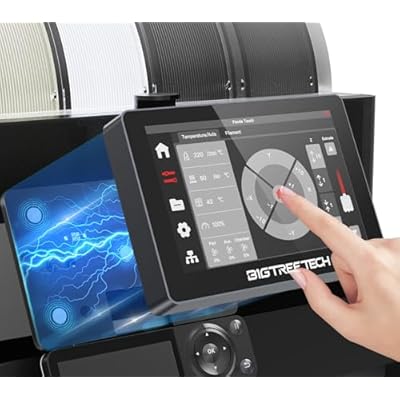
- Easy to Install: BIGTREETECH Panda Touch V1.0 is a 5-inch plug and play touchscreen display that is customized with UX and UI systems, providing a factory touch screen experience similar to the original X1C touchscreen. The installation steps are only two steps, base installation+wiring can complete the installation, giving you a more relaxed printing experience
- Two Power Supply Modes: BIGTREETECH Panda Touch V1.0 has two power supply modes. If the power switch is set to the middle position, the Panda Touch will be powered by a built-in lithium battery for convenient mobile use; Turn the power switch to the right gear, and the Panda Touch will be directly powered by the magnetic charging dock, without using lithium batteries to extend battery life
- Control Multiple Machines: BIGTREETECH Panda Touch V1.0 provides synchronization of multiple printer functions, allowing for synchronous control of printing, adjustment of printing parameters, and status of multiple printers. It also has various control functions for Bambu-Lab printers, such as print control, fan control, heating control, print file management, basic settings (LED light switch, WiFi connection, 3D printer device information settings)
- AMS Management: BIGTREETECH Panda Touch V1.0 provides an unparalleled intuitive experience by directly controlling AMS. On up to 10 printers, each printer supports up to 4 AMS units and 16 filament slots, allowing you to easily manage and customize filament types, colors, and printing temperatures using BTT Panda Touch. Easy multi-color printing for any Bambu-Lab 3D printer
Product Technical Details
| Package Dimensions | 7.48 x 4.84 x 1.93 inches |
| Item Weight | 11.3 ounces |
| Manufacturer | BIQU |
| Batteries | 1 Lithium Polymer batteries required. (included) |
What's in the box
BIGTREETECH Panda Touch
Who Should Buy?

-
3D Printing Enthusiasts
Users looking to enhance cooling capabilities for better print quality and reduce warping during printing sessions.
-
Bambu Lab Users
Owners of Bambu Lab P1P/P1S/X1C/X1E printers needing compatible ducting solutions for improved thermal management.
-
Modular Upgraders
Individuals interested in upgrading or customizing their 3D printer setup for optimized performance and efficiency.

-
Beginner Users
Newcomers to 3D printing may struggle with installation and modifications required for this fan duct system.
-
Budget-Conscious Buyers
Those seeking low-cost solutions may find this product relatively expensive compared to other basic cooling options.
-
Non-Compatible Models
Users with 3D printers outside the specified compatibility may not benefit from this cooling fan duct’s features.
Product Description
Have any Query? Chat with us
Customer Questions & Answers
-
Question:
What printers are compatible with the BIGTREETECH Panda Touch?
Answer: The BIGTREETECH Panda Touch is compatible with several models, specifically the Bambu-Lab P1P, P1S, X1C, X1E, and A1 Mini 3D printers. This compatibility ensures that users of these printer models can easily upgrade their machines with this touch screen kit. By integrating the Panda Touch, users can enhance their printing experience by utilizing its multi-printer management capabilities, allowing for smoother operation and better control over various printer functions. -
Question:
How does the multi-printer management feature work?
Answer: The multi-printer management feature allows users to control multiple 3D printers from a single touch screen interface. This is particularly beneficial for businesses or enthusiasts managing several printers simultaneously. With this feature, users can easily switch between printers, monitor their status, and make adjustments as necessary. This functionality streamlines workflow and enhances productivity, making it ideal for printing farms or users with multiple setups. -
Question:
What advantages does the touch screen provide?
Answer: The touch screen interface of the BIGTREETECH Panda Touch offers a more intuitive and user-friendly experience compared to traditional control methods. With a simple tap, users can access settings, monitor progress, and initiate prints with ease. The touch screen enhances usability for those who may not be familiar with complex menus or programming. This hands-on control means reduced setup time and increased engagement, making it easier for both beginners and experienced users. -
Question:
Can I use the Panda Touch with multiple 3D printers at once?
Answer: Yes, one of the key features of the Panda Touch is its ability to manage multiple 3D printers simultaneously. It streamlines operations for users who work with more than one printer by allowing them to control these devices from a singular interface. This is beneficial for users running printing farms or experimenting with various projects across different machines, as it keeps all functionalities centralized and accessible. -
Question:
Do I need any additional accessories to install the Panda Touch?
Answer: Typically, the installation of the BIGTREETECH Panda Touch does not require additional accessories since it is designed to fit with compatible printer models. However, it's wise to check the individual printer's specifications to ensure a smooth installation process. Users may need basic tools for mounting and to connect wiring securely. Being prepared ensures that the upgrade is efficient and effective without unnecessary delays. -
Question:
What is the role of the 2.4G connectivity feature?
Answer: The 2.4G connectivity feature enhances the communication capabilities between your touch screen and the 3D printer. This wireless technology allows for seamless data transmission, reducing the need for cumbersome cables and providing greater flexibility in printer placement. It is particularly useful in settings where space is limited, as it simplifies the setup process and helps to organize your workspace efficiently. -
Question:
Is there any software required to use the Panda Touch?
Answer: The BIGTREETECH Panda Touch typically works with the existing firmware of compatible 3D printers. However, users may need to check for updates or install compatible versions of software that support touch screen functionalities. This software integration is essential to harness the full potential of the touch screen features. Keeping the firmware updated ensures optimal performance and access to the latest functionalities. -
Question:
What user experience improvements can I expect from the Panda Touch?
Answer: Users can expect a significantly enhanced user experience with the BIGTREETECH Panda Touch, including improved navigation, faster access to printer settings, and streamlined control over multiple printers. The touch interface simplifies task management, allowing for effortless adjustments and monitoring. This upgrade is particularly advantageous for users who appreciate a hands-on approach and desire more immediate feedback during the printing process. -
Question:
How do I set up the BIGTREETECH Panda Touch after purchase?
Answer: Setting up the Panda Touch generally involves connecting the screen to the compatible printer, following the manufacturer’s instructions. Most setups require basic electrical connections and possibly updating the printer firmware to ensure compatibility. Detailed guides are typically provided, ensuring users can complete the setup smoothly. Having the right tools readily available and a clear workspace can enhance the installation experience. -
Question:
Where can I buy BIGTREETECH Panda Touch in Kazakhstan?
Answer: You can purchase the BIGTREETECH Panda Touch from Ubuy in Kazakhstan. Ubuy offers a reliable platform for acquiring various tech products, including this advanced touch screen kit designed for multiple Bambu-Lab printer models. Their website typically provides details about the product, including features, specifications, and customer support to assist you in making an informed decision.
BIQU 3D Printer Accessories Editorial Review


The BIQU Panda Jet Head Cooling Fan Duct garners a predominantly positive reception from customers who have integrated it into their Bambu Lab 3D printers. Users appreciate its straightforward installation process, where the fan duct easily plugs in and adjusts around the hot end, although some noted the need to cut the original fan enclosure for a proper fit. The build quality is lauded, with many customers reporting that it effectively directs airflow, thereby enhancing print cooling—a crucial factor for achieving high-quality 3D prints. While the performance enhancement is generally acknowledged, it seems to be subtle, especially when using standard nozzles, as some reviews indicate minimal differences in cooling compared to the original fan duct. A few users remarked on the necessity of ensuring correct alignment during installation, which is critical to maximizing performance. Feedback also highlights that the improvement is more pronounced when working with PLA and might benefit from testing with various nozzle sizes. However, there are reports of fragility, particularly concerning the lattice front cover, which some users found to be prone to breakage after limited use. This raises concerns about longevity and value for money, especially given the perceived high quality of the fan duct itself. Overall, the BIQU Panda Jet Head Cooling Fan Duct is seen as a useful upgrade for improved airflow and print quality, but with caveats regarding the durability of certain components. **
Customer Reviews & Ratings
121 customers ratings
-
5 Star
50%
-
4 Star
12%
-
3 Star
7%
-
2 Star
5%
-
1 Star
26%
Review this product
Share your thoughts with other customers
Pros
- Easy installation and adjustment compatible with multiple setups.
- Solid build quality providing effective airflow direction.
- Improves cooling performance for optimal hotend temperature and print quality.
- Versatile compatibility with stock hotends and Panda Revo/Flow systems.
Cons
- Minimal performance difference with standard nozzles (e.g., .4 nozzle) noted by some users.
Product Price History
Important information
- Limitations : For products shipped internationally, please note that any manufacturer warranty may not be valid; manufacturer service options may not be available; product manuals, instructions, and safety warnings may not be in destination country languages; the products (and accompanying materials) may not be designed in accordance with destination country standards, specifications, and labeling requirements; and the products may not conform to destination country voltage and other electrical standards (requiring use of an adapter or converter if appropriate). The recipient is responsible for assuring that the product can be lawfully imported to the destination country. When ordering from Ubuy or its affiliates, the recipient is the importer of record and must comply with all laws and regulations of the destination country.
- Not all the products listed on Ubuy are for sale, as Ubuy is a global search engine. Products are subject to export/trade regulations.
KZT 29153
Order now and get it around Saturday, June 27
This item is not restrict in my country.(Please click on above link if this item is not restrict in your country, So our team will review and allow.)
QTY:
Secured transaction
Ubuy works hard to protect your security and privacy. Our advanced payment security system ensures confidentiality by encrypting your information during transmission using AES (Advanced Encryption Standards) and SSL (Secure Socket Layer) protocols. Your payment details are 100% secure as we do not share your payment details with third party sellers.
Our Top Logistics Partners
Fastest cross-border delivery
Features & Benefits
- Wide compatibility with Bambu-Lab P1P/P1S/X1C/X1E printers.
- Features customizable RGB lighting for dynamic visual feedback.
- Precision injection molded for a premium feel and enhanced durability.
- Ultra-light design with 360° precision cooling for improved print quality.
- Convenient software control via ESP32 for easy management of lighting effects.
- Includes customizable light covers to create a unique appearance.