- Домашняя страница /
- Japanese Books /
- Компьютеры и технологии /
- Graphics, Desktop Publishing & Digital Music /
- Video Production /
- Premiere Pro Direction Techniques with DL Dat...
0 ratings





товар №:
88013748
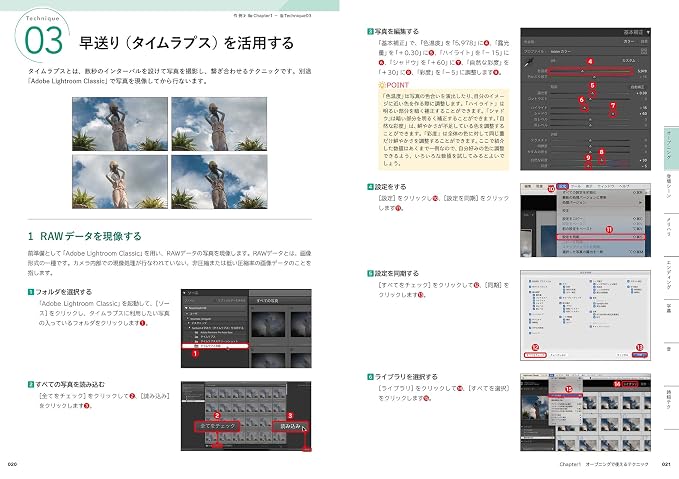
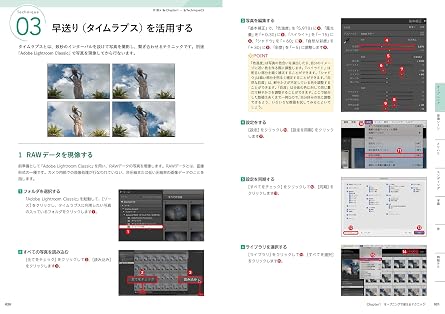
Premiere Pro Direction Techniques with DL Data 100 Useful Instantly! A collection of ideas that expands the range of video expression
товар №:
88013748
KZT 17826
Price Details
Excluding Shipping & Custom charges ( Shipping and custom charges will be calculated on checkout )
*All items will import from JP
В наличии
 Импортировано из магазина Japan
QTY:
На складе осталось всего 18 тов.
Закажите сейчас и получите товар приблизительно Monday, Август 24
Secured transaction
Ubuy works hard to protect your security and privacy. Our advanced payment security system ensures confidentiality by encrypting your information during transmission using AES (Advanced Encryption Standards) and SSL (Secure Socket Layer) protocols. Your payment details are 100% secure as we do not share your payment details with third party sellers.
Our Top Logistics Partners


Improve your video editing skills with this one book! Try 100 ways to expand your video expression using Adobe Premiere Pro today.

Fast
Shipping

Free
Return*

Secure Packaging

100% Original Products

PCI DSS Compliance

ISO 27001 Certified



Note: Step Down Voltage Transformer required for using electronics products of Япония store (100 V). Recommended power converters Купите сейчас.


What Stands Out
Comprehensive Techniques
Offers a collection of 100 instantly usable video direction techniques, expanding creative expression in video editing, ideal for both beginners and experienced editors looking to enhance their skills.
Expert Insights
Compiled by industry professionals, this hardcover book shares tested and proven methods, ensuring users gain valuable insights and practical advice to elevate their video production quality.
Durable Format
The high-quality hardcover format guarantees durability and longevity, making it a reliable resource that can endure frequent use while remaining a stylish addition to any creative workspace.
Информация о продукте
- Beginner! Improve your video editing skills with this one book! From the opening to the title, scenes where things and people appear, subtitles, audio, ending, and time-saving techniques. Try 100 ways to expand your video expression using Adobe Premiere Pro today. Download the example movie! *Project files are not included. Recommended for people like this ・People who want to disseminate information on YouTube or Vlog ・People who want to promote using videos ・People who have learned the basic operations of Premiere Pro and want to acquire practical skills 【Table of Contents】 Chapter 1: Techniques that can be used in the opening 01 Use fade-in and fade-out 02 Insert the video inside the title text 03 Utilize fast forwarding (time lapse) 04 Finish it with a movie-like beginning1 06 Gradually focus 07 Add graffiti anime-style effects 08 Hard-boiled by typewriter sound 09 Make it look cool with just the photo material It begins with the 10th act rising 11 Make your reception video stylish1 14 A production that changes from sketch to live-action 15 『passion continent 』 wind handwriting 16 『Star Wars』 Start in the wind 17 The title shakes as if floating in the waves 18 Direction where the title appears from behind the scenes Chapter 2: Techniques that can be used in scenes where people and things appear 21 Scenes featuring characters using freeze effects 22 Directed in the style of Sam Calder 23 Switch people and things using light 24 Trim part of the video to make it stand out 25 Background appears gradually 26 Rotate the screen 27 Use a concentrated line like HIKAKIN's product review 28 Suspense-style production using masks 29 “Anywhere Door” style production 30 Move only part of the still image to make people and things stand out 31 Make your smartphone screen look like science fiction with holograms 32 Leave only a portion of the black and white image in color 33 silhouette → appears in live action 34 Make it rain on sunny images 35 Make the day sky the night sky 36 Images appear in 3D style Chapter 3: Techniques for adding sharpness to long videos 37 Dramatically change colors 38 teleportation 39 Put in an eye catch 40 Countdown makes you nervous 41 Put in the wipes 42 Shake the image 43 Make noise like a TV dust storm 44 Reverse playback 45 Add mosaic 46 Split the screen 47 Shining lightning 48 Turn the image around 49 movie『inception』 style 50 Produce it like a flashback scene 51 Perform in an afterimage style 52 Perform a smartphone as an X-ray device 53 1. Produce in the style of a music video 58 Hide your face with characters 59 Create a halation style 60 Stimulate tension with target marks 61 Alter a person on the same screen 62 Inhaled by the eyes Chapter 4: Techniques that can be used in the ending 63 Pattern 1 of end rolls 65 Create material for YouTube's end screen 66 Showa skit style production 67 Make the entire screen sparkle 68 Move the words THE END 69 Finish beautifully with a blizzard of flowers 70 Scroll horizontally through the city in the background Chapter 5: Techniques to make subtitles appealing : Chapter 6: Techniques for making sounds heard : Chapter 7: Editing progresses smoothly! Time saving technique : : :
| Publisher | ビー・エヌ・エヌ |
| Publication date | March 23, 2021 |
| Language | Japanese |
| Print length | 256 pages |
| ISBN-10 | 4802512023 |
| ISBN-13 | 978-4802512022 |
| Item Weight | 740 g |
| Dimensions | 10.12 x 7.17 x 0.79 inches (25.7 x 18.2 x 2 cm) |
Who Should Buy?

-
Video Editors
Ideal for editors seeking new techniques to enhance their video projects with innovative direction methods.
-
Content Creators
Perfect for YouTubers and other creators looking to improve storytelling and visual expression through advanced editing skills.
-
Filmmaking Students
Beneficial for students wanting to learn practical editing techniques that will expand their creative video expression skills.

-
Beginners
Not suitable for those without any prior knowledge of Premiere Pro or video editing techniques.
ОПИСАНИЕ ТОВАРА
Есть вопрос? Пообщайтесь с нами в чате
Вопросы и ответы клиентов
-
вопрос:
Is this book suitable for complete beginners?
отвечать: Yes, it is designed for beginners and offers comprehensive techniques. -
вопрос:
Can I use this book to improve my YouTube videos?
отвечать: Absolutely! It provides a wealth of techniques tailored for YouTube and vlogs. -
вопрос:
Does the book include project files for practice?
отвечать: No, project files are not included, but you can download example movies.
井坂光博 , 谷口晃聖 Video Production Editorial Review


**** The "Premiere Pro演出技術" book appears to be a favorable resource for those looking to enhance their skills with Adobe Premiere Pro. Many customers appreciate the comprehensive nature of the content, which covers a variety of techniques from basic to advanced, making it suitable for aspiring YouTube creators and video editing enthusiasts. Reviewers highlight its practical approach, filled with effective examples and valuable tips on achieving popular effects such as text animations and live-action compositing. However, there are notable concerns among users regarding the limitations in downloadable materials. Many feel that the lack of access to essential project files and raw materials restricts hands-on learning, as engaging directly with the software is critical for mastery. This sentiment reflects a demand for more supportive resources alongside the text. Additionally, while the book is generally acknowledged as beginner-friendly, some readers suggest that absolute novices might find the lack of detailed guidance on navigating the software challenging. Despite these drawbacks, the overall reception is positive, with users expressing a desire for a second edition and recognizing the book's potential to facilitate a solid foundation in video editing techniques. **
Customer Reviews & Ratings
85 оценки клиентов
-
5 звезда
49%
-
4 звезда
18%
-
3 звезда
19%
-
2 звезда
9%
-
1 звезда
5%
Оцените этот товар
Поделитесь своими впечатлениями
Плюсы
- Comprehensive overview of Premiere Pro techniques.
- Practical examples useful for aspiring video creators.
- Generally beginner-friendly with accessible content.
- Positive user experience and satisfaction with the material.
Минусы
- Limited downloadable resources (only completed projects, no raw materials).
Platform Trust & Buyer Confidence

MA
Mohammad
Verified buyer
“Excellent quality and original too,when ubuy send original things I will appreciate that ,I very satisfied thank you”
23 July 2026 · via Trustpilot
CK
Chitra
Verified buyer
“The order and delivery progress was communicated very well. Package arrived within the estimated time. Products arrived as expected in good condition.”
22-Jul-26 · via Trustpilot
K
kund
Verified buyer
“Good supply of products. Safe payment methods, and shipment worldwide! Genuine products.”
23-Jul-26 · via Trustpilot
OO
Onesi
Verified buyer
“Was my first time buying a product from Ubuy, but I found it so helpful. This is reliable. Gonna place a new order!”
22 July 2026 · via Trustpilot
SJ
SAO JOHN
Verified buyer
“Ubuy is a great online platform to buy stuff. Reliable, fast delivery time and great value for money. I've been using Ubuy online shopping platform for three years now and will continue to do so.”
23 July 2026 · via Trustpilot
Безопасное оформление
Global Delivery
Easy Returns
Genuine Products
Product Price History
Важная информация
- Ограничения: обратите внимание, что для товаров, поставляемых за границу, гарантия производителя может быть недействительной; обслуживание от производителя может быть недоступно; руководства по эксплуатации, а также инструкции и предупреждения о безопасности могут быть не на языках страны назначения; товары (и сопутствующие материалы) могут не быть разработаны в соответствии со стандартами, спецификациями и требованиями к маркировке страны назначения; товары также могут не соответствовать напряжению в стране назначения и другим электрическим стандартам (при необходимости требуется использование адаптера или преобразователя). Получатель несет ответственность за обеспечение законного ввоза товара в страну назначения. При заказе через Ubuy или его аффилированных лиц получатель является зарегистрированным импортером и должен соблюдать все законы и правила страны назначения.
- Не все товары на Ubuy выставлены на продажу, поскольку Ubuy — это глобальная поисковая система. На товары распространяются законы в области экспорта и торговли.
KZT 17826
Закажите сейчас и получите товар приблизительно Monday, Август 24
This item is not restrict in my country.(Please click on above link if this item is not restrict in your country, So our team will review and allow.)
QTY:
На складе осталось всего 18 тов.
Secured transaction
PCI DSS compliant and ISO 27001:2022 certified, with encrypted payments and full buyer protection on every order.
Our Top Logistics Partners
Fastest cross-border delivery
Особенности и преимущества
- Learn 100 practical techniques for video editing in Premiere Pro.
- Perfect for beginners looking to enhance their video editing skills.
- Includes ideas for openings, scenes, and endings to make videos engaging.
- Great resource for YouTubers and vloggers wanting to promote content.
- Time-saving methods to maximize video production efficiency.
- Download example movie to see techniques in action.
Ubuy Assurance
Experience worry-free shopping with 100% original products, PCI DSS-compliant payment security, ISO 27001-certified data protection, the fastest cross-border delivery, free returns *, and secure packaging on every order.