0 ratings


Item #:
144013852
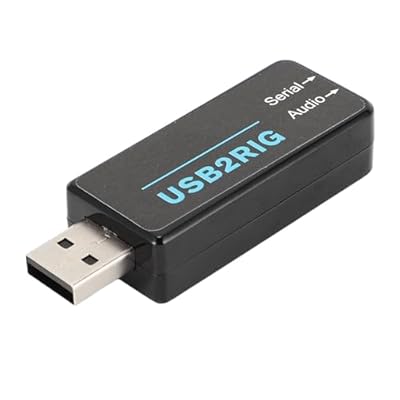
Digital Modes Interface USB AudioCAT Control for FT8 FT4 JS8Call Link - Plug & Play Multi-OS for Winforfor Linuxfor Androidfor iOS with ElecraftCable
86% of respondents would recommend this to a friend
Item #:
144013852
KZT 24267
Price Details
Excluding Shipping & Custom charges ( Shipping and custom charges will be calculated on checkout )
*All items will import from US
0 ratings
Write a review
In stock
 Imported from USA store
QTY:
Order now and get it around Tuesday, September 29
Secured transaction
Ubuy works hard to protect your security and privacy. Our advanced payment security system ensures confidentiality by encrypting your information during transmission using AES (Advanced Encryption Standards) and SSL (Secure Socket Layer) protocols. Your payment details are 100% secure as we do not share your payment details with third party sellers.
Our Top Logistics Partners


Experience seamless integration and unlock new possibilities in your radio communications.

Fast
Shipping

Free
Return*

Secure Packaging

100% Original Products

PCI DSS Compliance

ISO 27001 Certified



Note: Step Down Voltage Transformer required for using electronics products of US store (110-120). Recommended power converters Buy Now.


What Stands Out
Multi-OS Compatibility
Seamlessly works with Windows, Mac, Linux, Android, and iOS, ensuring versatile use for diverse users without needing additional drivers or installation hassles.
Plug & Play Setup
Easy installation allows users to get started quickly without technical expertise, making it ideal for beginners and busy operators looking to optimize their digital mode experiences.
Enhanced Cable Support
Compatible with Elecraft and Xiegu cables, providing flexibility and reliability for various rigs, enhancing connectivity and performance when using popular digital mode applications.
Product Details
| Compatible Devices | Personal Computer, Tablet |
| Connectivity Technology | USB |
| Number of Channels | 2 |
| Operating System | Linux, Windows, iOS, macOS |
| Audio Input | USB |
| Maximum Sample Rate | 192 KHz |
| Item Weight | 16 Grams |
| Brand Name | Zopsc |
| Manufacturer | Zopsc |
| Manufacturer Part Number | Zopsc7ceqtrox95 |
| Model Number | Zopsc7ceqtrox95 |
| Item Type Name | Amplifiers |
| Brand | Zopsc |
Who Should Buy?

-
Amateur Radio Operators
Ideal for ham radio operators looking to engage in digital modes like FT8 and FT4 effortlessly.
-
Multi-Platform Users
Supports diverse operating systems, making it perfect for users working across Windows, Mac, Linux, Android, and iOS.
-
Remote Communication Experts
Great for users needing reliable CAT control and audio interface for remote digital communications over various platforms.

-
Beginner Users
May overwhelm new users unfamiliar with digital modes and CAT control setup without prior experience or knowledge.
Product Description
Digital Modes Interface USB AudioCAT Control for FT8 FT4 JS8Call Link - Plug & Play Multi-OS for Winforfor Linuxfor Androidfor iOS with ElecraftCable Support
Have any Query? Chat with us
Customer Questions & Answers
-
Question:
What is the Digital Modes Interface USB Audio/CAT Control used for?
Answer: The Digital Modes Interface USB Audio/CAT Control is designed to facilitate digital communications using modes like FT8, FT4, JS8Call, and WinLink. It acts as an interface between your computer and transceiver, enabling seamless audio transmission and CAT control. This device is essential for digital mode enthusiasts as it simplifies the setup process, allowing users to connect their radio to various operating systems without complex configurations. -
Question:
Is the Digital Modes Interface compatible with all operating systems?
Answer: Yes, this interface is a plug-and-play device compatible with multiple operating systems, including Windows, Mac, Linux, Android, and iOS. This versatility allows users to operate on their preferred devices without needing additional software or drivers. It's particularly useful for those who switch between operating systems or use different devices for their digital communications. -
Question:
What are the main features of the Digital Modes Interface?
Answer: Key features include USB audio support for high-quality sound, CAT control functionality for easy radio tuning, and compatibility with popular digital modes such as FT8, FT4, and JS8Call. Additionally, it supports multiple platforms, making it ideal for diverse user setups. These features combined allow for a straightforward and effective communication experience across different operating systems and modes. -
Question:
Can I use the Digital Modes Interface with different radios?
Answer: Yes, the Digital Modes Interface is compatible with various radios that support USB and CAT control. Its design allows for connection to many popular beginner and advanced models. Whether you're using a versatile handheld transceiver or a robust base station, this interface can enhance your digital operations, making it an excellent choice for both new and experienced hams. -
Question:
How do I set up the Digital Modes Interface for the first time?
Answer: Setting up the Digital Modes Interface is straightforward. Simply connect the device to your computer's USB port and your radio's appropriate audio and control ports. Most operating systems will automatically recognize the device. After that, just select the correct audio input/output settings in your digital mode software. This simple setup allows you to start communicating with minimal effort right away. -
Question:
Is the interface suitable for mobile use?
Answer: Absolutely! The Digital Modes Interface is compact and portable, making it an excellent option for mobile operations. Whether you're out in the field or at a temporary station, this device can easily fit in a backpack or portable setup. It is particularly advantageous for ham operators who participate in field days or emergency communications, providing flexibility and convenience. -
Question:
What modes can I operate using this interface?
Answer: This interface supports various digital communication modes. You can effectively use FT8, FT4, JS8Call, and WinLink among others. Each mode has its unique features and advantages for communication, allowing users to engage in quick exchange functions or more extended messaging as needed. This versatility makes it an essential tool for amateur radio enthusiasts. -
Question:
Do I need any additional software to use the Digital Modes Interface?
Answer: The Digital Modes Interface is designed for ease of use and may not require additional software for basic operations. However, for optimal performance, software such as WSJT-X for FT8/FT4 and JS8Call, or WinLink Express for WinLink messages, can enhance your experience. These applications enable full use of the interface's capabilities, ensuring you can leverage digital modes effectively. -
Question:
How does the CAT control feature work?
Answer: The CAT (Computer Aided Tuning) control feature allows your computer to remotely control radio functions such as frequency adjustments and mode changes. Through a USB connection, the Digital Modes Interface communicates seamlessly with your radio, allowing you to tune and operate without manually adjusting knobs. This is especially useful for digital modes that require precision, making your operations more streamlined and efficient. -
Question:
Where can I buy the Digital Modes Interface in Kazakhstan?
Answer: You can purchase the Digital Modes Interface USB Audio/CAT Control from Ubuy, which offers a wide range of electronics and accessories. Ubuy is a reliable platform that provides Kazakhstan shipping to Kazakhstan, so you can conveniently receive your interface and start exploring digital modes quickly and efficiently.
Zopsc Audio Interfaces Zopsc7ceqtrox95 Editorial Review
No editorial reviews found
Customer Reviews & Ratings
1 customers ratings
-
5 Star
100%
-
4 Star
0%
-
3 Star
0%
-
2 Star
0%
-
1 Star
0%
Review this product
Share your thoughts with other customers
Pros
- Easy plug-and-play setup
- Works across multiple OS
- Supports various digital modes
- High-quality audio performance
- Compact and portable design
Cons
- Limited documentation for first-time users.
Platform Trust & Buyer Confidence

JK
Jasmin
Verified buyer
“Great products and very good service: very easy and very fast international delivery.”
9 September 2026 · via Trustpilot
AG
Anke
Verified buyer
“Wonderful online shopping experience, smooth transaction from the start. Payment method works conveniently and delivery is unexpectedly fast and reliable. You go the extra mile for service. What makes this even more amazing, you deliver to Namibia. I will remain a happy Ubuy customer and will increase my purchases for sure! Thank you!”
10 September 2026 · via Trustpilot
H
Hazel
Verified buyer
“Very easy to find the products what you need, and so fast delivery, that’s why I highly recommended to others costumers to used ubuy.”
10 September 2026 · via Trustpilot
O
Opaleye
Verified buyer
“I received exactly what I ordered I was skeptical about your site because that was my first time to order. But the order came timely and neatly packaged. I was not disappointed. Thank you.”
11 September 2026 · via Trustpilot
AC
Adele
Verified buyer
“Easy to find and order what you want on the website. Delivery is quick to the UK”
8 September 2026 · via Trustpilot
Secure Checkout
Global Delivery
Easy Returns
Genuine Products
Product Price History
Important information
- Limitations : For products shipped internationally, please note that any manufacturer warranty may not be valid; manufacturer service options may not be available; product manuals, instructions, and safety warnings may not be in destination country languages; the products (and accompanying materials) may not be designed in accordance with destination country standards, specifications, and labeling requirements; and the products may not conform to destination country voltage and other electrical standards (requiring use of an adapter or converter if appropriate). The recipient is responsible for assuring that the product can be lawfully imported to the destination country. When ordering from Ubuy or its affiliates, the recipient is the importer of record and must comply with all laws and regulations of the destination country.
- Not all the products listed on Ubuy are for sale, as Ubuy is a global search engine. Products are subject to export/trade regulations.
KZT 24267
Order now and get it around Tuesday, September 29
This item is not restrict in my country.(Please click on above link if this item is not restrict in your country, So our team will review and allow.)
QTY:
Secured transaction
PCI DSS compliant and ISO 27001:2022 certified, with encrypted payments and full buyer protection on every order.
Our Top Logistics Partners
Fastest cross-border delivery
Features & Benefits
- Effortlessly connect your radio to your computer with innovative digital interface.
- Unlock new possibilities in radio communications with enhanced digital mode capabilities.
- Versatile design combines sound card, serial port, and PTT control into one device.
- Compatible with various operating systems and popular digital modes like FT8 and FT4.
- Easy plug-and-play connectivity, requiring no drivers for setup.
- Professional-grade experience with prefabricated transceiver cables for top brands.
Ubuy Assurance
Experience worry-free shopping with 100% original products, PCI DSS-compliant payment security, ISO 27001-certified data protection, the fastest cross-border delivery, free returns *, and secure packaging on every order.