Explore Electronic Music Equipment for Every Setup
Electronic music equipment brings together the instruments, audio tools, and accessories used to create, perform, record, and shape music. A setup may include synthesizers, drum machines, MIDI controllers, samplers, audio interfaces, studio monitors, headphones, microphones, and cables. Producers often combine several devices, while live performers may prioritize portable instruments and quick control. Understanding how each product fits into a signal chain makes it easier to choose gear that works together, whether you are building a home studio, preparing a stage rig, or experimenting with electronic sound. Ubuy helps shoppers discover international electronic music products across these uses. Start with your main goal, available space, and preferred workflow, then compare connections, software support, and essential features before adding optional accessories.
- Gear for production, recording, and live performance
- Options for beginners, creators, and experienced musicians
- Compare workflow, connections, and available space
Synthesizers, Drum Machines, and Samplers
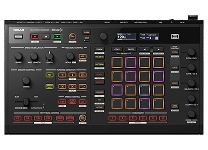
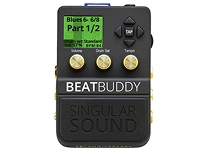
Synthesizers generate tones using sound engines such as analog, digital, or wavetable synthesis, with controls for oscillators, filters, envelopes, and modulation. A keyboard synthesizer suits hands-on playing, while a desktop module can save space in a compact studio. Drum machines provide sequenced percussion patterns and may include sound design controls, performance pads, or step programming. Samplers let musicians capture, edit, and trigger audio, making them useful for chopped vocals, field recordings, and custom drum kits. Some instruments combine these functions, so compare sound architecture, polyphony, preset storage, sequencing tools, and performance controls. Check whether a device offers MIDI, USB, or audio outputs compatible with your other equipment. Established makers such as Roland, Korg, and Akai Professional offer products across these instrument categories.
- Compare analog, digital, and wavetable sound engines
- Check sequencing, sampling, and performance controls
- Match MIDI and audio connections to your setup
MIDI Controllers, Keyboards, and Performance Tools
MIDI controllers send performance data to music software or compatible hardware rather than producing sound on their own. Keyboard controllers are available with different key counts and action types, while pad controllers support finger drumming, clip launching, and sample triggering. Knobs, faders, transport buttons, pitch wheels, and modulation controls can make software workflows more tactile. Before buying, confirm the controller's connection type, power needs, MIDI format, and compatibility with your computer, tablet, or instrument. Also consider whether your chosen music production software recognizes its controls or requires mapping. Novation and other established manufacturers offer controllers for varied creative workflows. A sustain pedal, expression pedal, stand, or USB hub may complete a setup, but check connector standards and device requirements before adding accessories.
- Choose keys, pads, and controls for your workflow
- Confirm software, device, and MIDI compatibility
- Consider pedals, stands, and connection needs
Audio Interfaces, Monitors, and Recording Gear
An audio interface connects microphones, instruments, and other audio sources to a computer or recording system. Compare the number of inputs and outputs, microphone preamps, instrument-level inputs, headphone monitoring, and supported connection standards. Sample rate and bit depth matter in recording specifications, but practical needs such as low-latency monitoring and suitable input count are often more important when selecting a first interface. Studio monitors reveal playback detail, while closed-back headphones help with tracking and open-back designs are often chosen for focused listening. Room size, speaker placement, and acoustic treatment also influence monitoring decisions. Microphones, pop filters, monitor stands, and balanced cables can support a recording chain. Focusrite is a recognized audio-interface brand; compare specific models by I/O, compatibility, and intended recording tasks.
- Match interface inputs and outputs to recording needs
- Compare monitors and headphones for listening tasks
- Plan for microphones, cables, and room placement
Music Production Software, Effects, and Connectivity
Digital audio workstations, or DAWs, provide the environment for arranging, recording, editing, and mixing music. Virtual instruments and audio effects expand a project with synthesizers, samplers, equalizers, compressors, reverbs, and other processing tools. Hardware effects and pedals can add hands-on control or shape signals outside the computer. Check operating-system support, plug-in formats, licensing terms, and the computer's processing and storage capacity before committing to software or related gear. In a hardware setup, MIDI clock and synchronization features help sequencers and instruments stay in time, while audio connections carry sound between devices. USB, MIDI DIN, and line-level audio serve different purposes, so verify ports and cable types rather than assuming they are interchangeable. Keep software updated and back up projects and presets regularly.
- Compare DAWs, plug-ins, and system requirements
- Understand MIDI, clock, and audio signal paths
- Back up projects, sounds, and custom presets
Select the Right electronic music equipments
Choose electronic music equipment around the task you perform most: composing, beat making, recording vocals, playing live, or learning sound design. Set a practical budget for core gear first, then allow for cables, headphones, storage, stands, and other essentials. Check dimensions and portability for a mobile rig, and review power requirements, operating-system support, input and output counts, and instrument compatibility for a studio setup. Beginners may benefit from an all-in-one workstation or a focused controller-and-software combination; experienced producers may prefer specialized synthesizers, modular components, or dedicated monitoring. Read feature lists carefully and distinguish included software or accessories from optional items. Ubuy can help shoppers explore international products in the category. Maintain equipment by keeping vents clear, handling connectors carefully, and storing devices away from moisture and dust.
- Prioritize your primary creative or performance task
- Check compatibility, power, dimensions, and included items
- Plan upkeep and accessories alongside core equipment